
Skip to content

QNAP QDA-SA2-4PCS адаптер

SKU KXG0139700

Избери период за изплащане и виж месечната вноска

Месечна вноска Обща сума за плащане ГПР Лихва Банка
Description

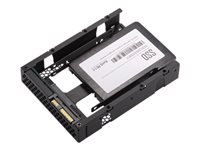
QNAP QDA-SA2-4PCS 2.5in SATA to 3.5in SAS Adapter
   
Manufacturer QNAP SYSTEMS
Manufacturer Part No QDA-SA2-4PCS
 
Marketing Description
The QDA-SA2 adapter is designed for dual-controller servers and QNAP Enterprise ZFS NAS and allows the use of a 2.5-inch SATA 6Gbps SSD in a 3.5-inch SAS drive bay. It can be installed in a QNAP NAS or server (Windows, Linux) - providing the capacity to replace an expensive SAS drive with a more-affordable yet high-performing SATA SSD.
Product Features
  • SAS dual-port advantage for fault tolerance
    SAS features dual porting for redundancy, eliminating single points of failure and allowing for higher reliability and performance. Although SATA 6Gbps SSDs provide high-performance and affordable storage, the lack of dual-port support makes them unsuitable for dual-controller environments. By installing a SATA SSD with the QDA-SA2 into a dual-controller Enterprise ZFS NAS or a dual-controller server, the SATA SSD can share these SAS dual-port advantages to ensure a high-availability, fault-tolerant enterprise storage environment.
  • Designed for dual-controller servers and Enterprise ZFS NAS
    The QDA-SA2 can be easily installed in a dual-controller Windows/Linux SAS server and the 3.5-inch disk tray of an Enterprise ZFS NAS.
General
Packaged Quantity 4 (specifications are for single item)
Device Type Interface adapter - internal
Supported Form Factor 3.5" to 2.5"
Host Bus SAS 6Gb/s
Storage Controller
Interface SATA 6Gb/s
Supported Devices Solid state drive
Max Storage Devices Qty 1
Expansion / Connectivity
Interfaces 1 x SATA 6Gb/s
Connections 2 x SAS 6Gb/s
Dimensions & Weight
Width 10.16 cm
Depth 13.82 cm
Height 2.59 cm

Compare products

{"one"=>"Select 2 or 3 items to compare", "other"=>"{{ count }} of 3 items selected"}

Select first item to compare

Select second item to compare

Select third item to compare

Compare